 RapTor
Tor Browser Guide: Install It From the Right Place, Verify It, and Get Connected
This Tor Browser guide covers the part every other tutorial skips: not just how to click through the installer, but how to confirm the file you downloaded is the one Tor Project actually built, and what's changed since most of the guides ranking for this query were written. The current stable release is Tor Browser 15.0.23, shipped 15 September 2026 with backported Firefox security fixesTor Project blog, 15 Sept 2026 — worth stating with a date because Firefox's underlying release cadence moved to roughly every two weeks in September 2026, so a guide's version number goes stale faster now than it used to. EFF's own widely-cited Tor walkthrough, for comparison, documents version 14.0.4 and was last reviewed in January 2025EFF Surveillance Self-Defense — more than a year and several major versions behind as of this writing, which is the norm for third-party guides in this space, not the exception.
Where the real download is, and how to confirm it's genuine
Download only from torproject.org/download, typed directly rather than reached through a search result — a search ad or a lookalike domain is a real risk for a target this well-known. Each installer on the official download page ships beside a matching .asc signature file, which is what actually proves the download hasn't been tampered with, rather than just trusting the padlock icon in your ordinary browser.Tor Project Verifying it takes four steps, the same on Windows, macOS, and Linux, once GnuPG is installed:
- Download the installer and its matching
.ascfile from the same page, into the same folder. - Import the Tor Browser Developers signing key:
gpg --auto-key-locate nodefault,wkd --locate-keys torbrowser@torproject.org. Confirm the fingerprint it reports matchesEF6E286DDA85EA2A4BA7DE684E2C6E8793298290exactly.Tor Project - Export it to a local keyring:
gpg --output./tor.keyring --export 0xEF6E286DDA85EA2A4BA7DE684E2C6E8793298290. - Verify:
gpgv --keyring./tor.keyring [installer].asc [installer], substituting your actual downloaded filenames. A successful check reports "Good signature from 'Tor Browser Developers (signing key)'"; anything else means don't run the installer, and start over from the official download page.Tor Project
This is the step every guide ranking for "Tor Browser guide" links to and none of them actually performs. It takes about two minutes once GnuPG is installed, and it's the only way to know the file wasn't altered between Tor Project's build server and your download.
One current wrinkle on Windows specifically, worth naming so it doesn't read as tampering: the DigiCert EV certificate Tor Project uses to sign the Windows installer executable itself — a separate, OS-level check from the GnuPG verification above — expired on 1 September 2026 and was still not renewed as of the 15.0.23 release, so a from-scratch install of 15.0.21, 15.0.22, or 15.0.23 on Windows can trigger a "bad signature" or unrecognized-publisher warning from Windows itself, not from GnuPG.Tor Project blog, 15 Sept 2026 Tor Project's own workaround is to keep 15.0.20 — the last version signed with a valid certificate — listed on the Windows download page, and let automatic updates (signed with a different key that isn't affected) carry existing installs forward to the current version. If you're installing fresh on Windows and want the current release rather than 15.0.20, download it directly from Tor Project's distribution directory and expect that warning; it does not mean the GnuPG signature check above will fail, and the two checks should not be confused with each other.
First launch: what to click, and what "connect automatically" saves
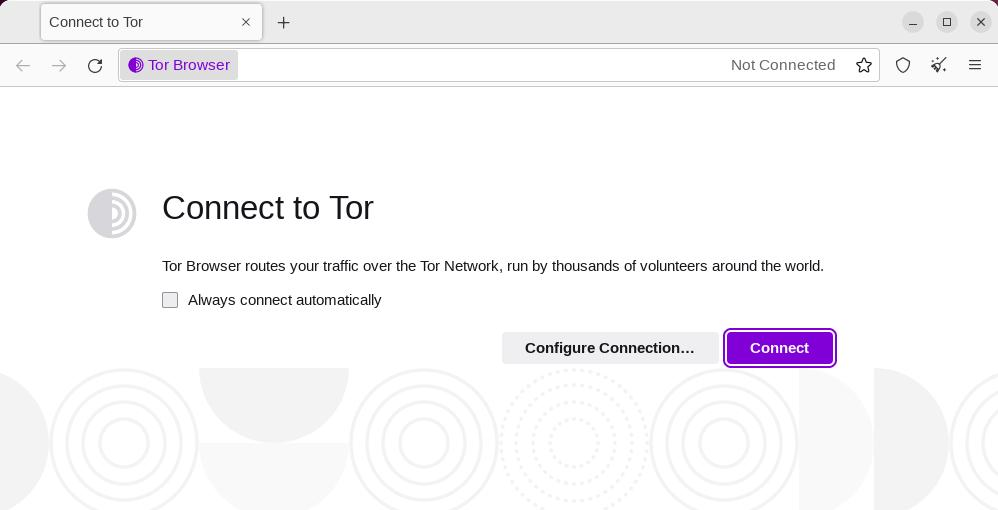
On first run you'll see a Connect window with two choices: "Connect" for a direct connection, or "Configure Connection" if your network is censored or requires a proxy.Tor Project For most readers, "Connect" is correct — Tor Browser handles the circuit setup automatically, and a progress bar shows connection status. If it stalls, Connection Assist can select a working bridge for your region automatically rather than making you guess.Tor Project The "Always connect automatically" toggle, if enabled, reuses your last working connection settings on every future launch rather than showing this screen again — worth turning on if your network setup doesn't change, and worth leaving off if you regularly move between a normal connection and a censored or filtered one, since it will otherwise try the wrong method silently.
The Linux execute-permission step
After extracting the Linux archive, double-clicking start-tor-browser.desktop sometimes does nothing, because the file isn't marked executable by default. From a terminal inside the extracted folder, run chmod +x start-tor-browser.desktop, then launch it again — this single command resolves the most common "nothing happens when I click it" report on Linux.Tor Project Note also that 32-bit Linux support ends with the next major release line, Tor Browser 16.0, so a 32-bit machine will need to stay on an older release or move to 64-bit hardware to keep receiving updates.Tor Project
Which settings are worth touching on day one
Fewer than you'd expect. Tor Browser ships configured correctly for most people by default, and the biggest mistake a new user makes is over-configuring it. Worth doing on day one: nothing beyond confirming your connection succeeded and, if you're on a page that supports it, noticing the onion-site icon in the address bar when one is available. Worth leaving alone: the Security Level slider, which trades away real functionality for real protection and is a threat-model decision covered in full — with the specific adversaries it defends against — on Tor Browser safety, not something to crank up reflexively on day one without knowing what it breaks. Also worth leaving alone: installing any extension at all, resizing the browser window from its default size, and changing your system's default zoom level — all three make your specific browser instance more distinguishable from every other Tor Browser user's, which is covered in full below. HTTPS-Only Mode is already on by default, upgrading connections to encrypted HTTPS wherever a site supports it, so there's nothing to configure there either — it's one less step than most ordinary-browser tutorials assume you need to take.Tor Project The search bar also offers an "Onionize" toggle that routes your search through the onion version of DuckDuckGo rather than the standard one — more private, at the cost of being somewhat slower to load, and a reasonable default to leave on for search specifically even while you leave everything else at its shipped setting.
Do you also need a VPN?
Not by default, and not as a reflex. Tor Project's own guidance is that combining a VPN with Tor is not something most people need, and doing it incorrectly can reduce rather than improve your privacy, depending on the order you connect them in and what each layer can then see about the other.Tor Project If you're specifically trying to hide the fact that you're using Tor at all from your local network or ISP, a bridge — covered on the Tor bridges guide — is the tool built for that job. The fuller comparison of what a VPN protects that Tor doesn't, what Tor protects that a VPN doesn't, and the specific cases where stacking them changes your risk one way or the other, is worth reading in full on Tor vs. VPN before you install anything else alongside Tor Browser.
What the circuit display shows, and getting a new one for a single site
Click the site-information icon in the URL bar to see the circuit — the specific relays your traffic is currently routing through for that tab.Tor Project All connections to one website address reuse the same circuit, so browsing multiple pages of a single site in different tabs doesn't lose functionality the way constantly rotating would; a new domain gets an automatically different circuit, which is what stops two different sites using the same tracking script from linking your visits together.Tor Project If a specific site won't load or an exit relay seems to be misbehaving for it, "New Tor circuit for this site" — in the same menu — reloads just that tab over a fresh circuit without touching your other open tabs or clearing anything.Tor Project
What New Identity destroys, and when to use it
"New Identity," in the main menu, is a different and much bigger action than a new circuit: it closes every open tab and window, clears cookies and browsing history, and starts fresh circuits for all connections, and it will warn you before doing it because any in-progress downloads and activity get stopped in the process.Tor Project Use it when you want your subsequent browsing to be unlinkable from what came before — switching between two contexts you don't want connected to each other is the clearest case. Don't reach for it as a general "refresh" button; if only one site is having trouble, "New Tor circuit for this site" solves that without discarding your whole session. And don't confuse either option with actual anonymity across a whole operating system: both only affect Tor Browser's own tabs and circuits, and any other application on the same machine keeps using its ordinary, unprotected connection the entire time, regardless of which identity option you've just clicked.
Why extensions and resizing the window work against you
Tor Browser's anonymity set is every other person running an unmodified Tor Browser — the more identical you look to that crowd, the harder any single person is to pick out. An installed extension is a detail a fingerprinting script can potentially detect, and it's also a piece of software that hasn't been vetted the way Tor Browser's own built-in protections have; Tor Project explicitly advises against adding any.Tor Project Resizing the browser window works against you for a less obvious reason: Tor Browser ships at a small set of common window sizes specifically so your window dimensions don't stand out, and a non-default size is one more measurable, potentially unique data point a fingerprinting script can read off your session, in the same category of concern that Tor Browser safety covers in full for fingerprinting generally. Neither habit is likely to deanonymize you on its own, but both make you more distinguishable than the default configuration, for no real benefit.
Android yes, iPhone no — and why
Tor Browser for Android is an official Tor Project release, available through Google Play, F-Droid, or Tor Project's own site, supporting Android 5.0 and newer.Tor Project There is no Tor Browser for iOS at all — not a stripped-down version, none — because Apple requires every browser on iOS, regardless of vendor, to use Apple's own WebKit rendering engine rather than a browser's own engine, which removes the specific engine-level protections Tor Browser depends on. Tor Project's own recommendation for iPhone users is a separate, independently developed app called Onion Browser, open source and built by a developer who works closely with the Tor Project, with the explicit caveat that Apple's WebKit requirement means it cannot match Tor Browser's full protections.Tor Project
When a site blocks Tor, and uninstalling cleanly
Some sites specifically block or heavily challenge traffic they detect as coming from Tor exit relays, showing a repeating CAPTCHA loop or an outright block page. There's no universal fix — trying "New Tor circuit for this site" to get a different exit relay resolves it some of the time, since not every exit relay is blocked equally, and if a site is essential and remains unreachable, that's a real, if frustrating, cost of the protection Tor provides rather than a bug to work around by disabling security features. If access itself is being blocked at the network level rather than by an individual website, that's a censorship problem rather than a single-site problem, and the guide to Tor bridges covers the transports built for exactly that case. Uninstalling cleanly needs no special process: Tor Browser doesn't install background services or write to system locations the way ordinary software does, so deleting the Tor Browser folder — and, on Windows, running the uninstaller if one was created during install — removes it completely, with no registry cleanup or leftover service to hunt down afterward. If you're moving to a new machine rather than removing Tor Browser entirely, there's nothing to migrate beyond your bookmarks and any saved bridge configuration — no account, no license key, and no profile tied to hardware the way some other software requires.
Once you're connected, how Tor works and how onion services work cover the mechanics behind what you just set up, and the darknet markets overview covers the verification habits worth having before you use this browser for anything that matters.