 RapTor
Whonix Guide: Setting Up the Gateway and Workstation Pair
The top result for a Whonix guide right now is a gaming-focused site claiming an IP leak through Whonix is flatly "impossible," with no hardware requirements listed anywhere on the page and no mention of the one fact that matters most for informed consent: Whonix is not amnesic. A widely linked forum thread a few results down documents a version of Whonix that's been dead for years. This Whonix guide starts from the current release, states the hardware bill honestly, and is explicit about what the isolation between the Gateway and the Workstation does and doesn't protect against — including the one condition that quietly defeats the entire design if it's not met.
Which version is current, and avoiding a guide written for an old one
The current major release is Whonix 18, and one specific, checkable detail separates a current guide from an outdated one: new Whonix LXQt images ship with a security feature called user-sysmaint-split enabled by default, splitting daily use and administrative tasks into two separate accounts.Whonix If a guide you're reading never mentions a sysmaint session or two different accounts, it was very likely written against Whonix 17 or earlier, before this default changed — and following its administrative steps as written, inside a fresh Whonix 18 install, is exactly when you'll hit a "permission denied: sudo" error, because you're running commands as the wrong account for the task. This page assumes the current default.
Whether you have the memory, disk and processor features required
Whonix's minimum is genuinely low compared to Qubes: 1 GB of free RAM, with the Gateway able to run on as little as 256 MB, plus 10 GB of free hard drive space and a CPU with AMD-V or Intel VT-x — the same virtualization extensions Qubes OS requires, just without Qubes' additional IOMMU (VT-d) demand For comfortable daily use rather than the bare floor, the project recommends a solid-state drive and 8 GB of RAM total, reasoning transparently that a typical split looks like 2 GB for the host operating system, 2 GB for the Gateway, and 4 GB for the Workstation Any operating system able to run a supported virtualizer — Windows, macOS, BSD, or Linux — can host Whonix this way; the one hardware exception is that no Whonix VirtualBox image is currently available for Apple Silicon Macs (M1, M2, and later) at all, so an Intel Mac or a non-Mac host is required for that route today.
VirtualBox, KVM, or on top of Qubes — which to choose and what each costs
VirtualBox and KVM both run Whonix as a Type 2 hypervisor setup: two virtual machines sitting on top of whatever operating system you already have installed, which is the lowest-friction path and the one most beginners should start with. Qubes-Whonix runs the same Gateway-and-Workstation pair on Qubes OS instead, where Qubes' own bare-metal Xen hypervisor hosts them directly rather than through a host OS — and Whonix's own documentation is direct about the trade-off this buys: Qubes-Whonix "provides significant speed and security advantages relative to the traditional Type 2 hypervisor model," plus a template-based filesystem where updating one template updates every VM built from it, rather than updating each Whonix VM individually as Non-Qubes-Whonix requires The cost of that upgrade is simply Qubes' own much larger hardware bill, covered in full on secure operating systems. Choose VirtualBox or KVM if your hardware can't clear Qubes' floor or you want to try Whonix without committing to a new operating system; choose Qubes-Whonix if your hardware already supports Qubes and you want the isolation Whonix provides extended to everything else you do on the machine too.
What the Gateway and Workstation each do, and in what order they start
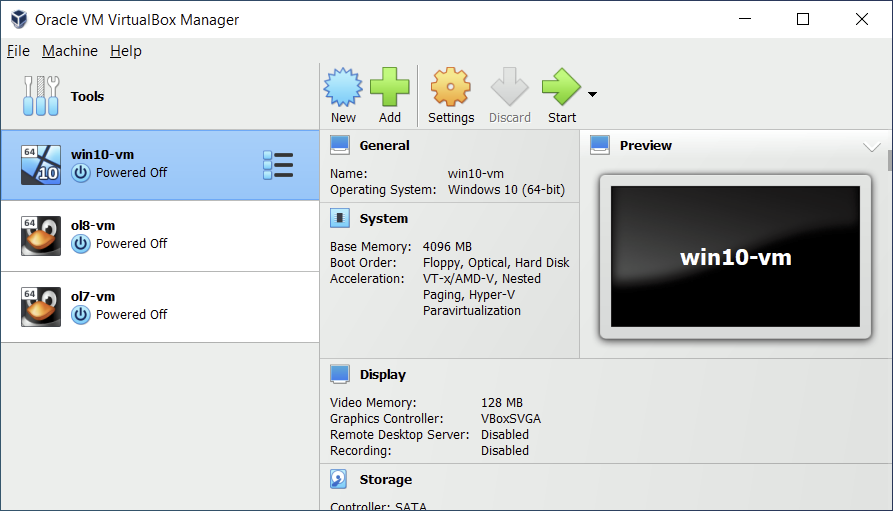
The two machines have a strict, one-directional relationship. Whonix-Gateway handles all Tor traffic and nothing else — it's the only one of the pair with any route to the internet. Whonix-Workstation is where you actually work, browse, and run applications, and it has no network path except through the Gateway; every packet the Workstation sends is forced through Tor because there is no other way out, which is the entire point.Privacy Guides In practice this means the Gateway needs to be running and have Tor bootstrapped before the Workstation's network connection is useful — starting both together after importing them is the normal flow, and the Workstation will simply have no connectivity until the Gateway is up Even a fully compromised Workstation, under this model, cannot leak your real IP address, because it genuinely has no route to reach it directly.
Whether Whonix is amnesic like Tails, and what remains on disk
No. This is the single most consequential difference from Tails, and the fact the top-ranking guide for this query currently omits entirely. Both VMs are ordinary persistent virtual disks: browsing history, downloaded files, installed software, and anything else you do inside either machine remains on that VM's virtual disk file after shutdown, exactly the way a normal computer's hard drive would, unless you deliberately delete it. If your threat model specifically requires that a seized machine yield nothing, Whonix's persistence works against you, and Tails' amnesia is the better fit; if your threat model is a remote compromise of software you're running rather than a physical seizure, Whonix's isolation between Gateway and Workstation is the stronger protection of the two. The fuller version of this trade-off, including where Qubes fits, is on secure operating systems.
What the maintenance session is for, and why there are two boot modes
user-sysmaint-split creates exactly two accounts on each machine: user for daily activities, and sysmaint for administrative work like installing software or running an upgrade — and the project's own guidance is unambiguous about which one to use for which task: "Boot into the sysmaint session. This is the recommended way to perform administrative tasks, to run tools such as sudo or pkexec."Whonix The GRUB boot menu offers both a persistent user session for everyday use and a persistent sysmaint session for maintenance, plus live variants of each — the separation exists specifically so that your daily browsing session never has administrative rights available to malware that might compromise it, and a compromise of the user session alone can't silently install anything system-wide. If you ever see "permission denied: sudo" or "permission denied: pkexec," that's the system telling you you're in the wrong session for what you're trying to do — reboot into sysmaint, run the administrative command there, then reboot back into the user session afterward rather than staying in sysmaint for daily use
Moving a file between host and Workstation without carrying metadata across
Every method of getting a file into or out of the Workstation carries some risk, and Whonix's own file-transfer documentation states the general rule plainly: isolation is weakened whenever data crosses between the host and the Workstation, so the transfer itself "must be performed carefully."Whonix Transferring an ISO image is the method the project calls out as safest for bringing something in, precisely because it's a one-way, read-only path VirtualBox and KVM shared folders work and are commonly used, but the project's own hardening guidance is direct that they're "discouraged because it weakens isolation between the guest and the host," since a specially defined shared path is itself an enlarged attack surface an attacker in one machine can use to reach the other Before anything leaves the Workstation, strip its metadata from inside the Workstation itself using the pre-installed MAT2 tool — never on the host — since documents, images, and videos commonly carry hidden author, device, timestamp, and location data, and the project's guidance is specific that only files "either created or downloaded inside the Whonix-Workstation and personally stripped of metadata" should ever be shared or uploaded MAT2 itself is honest about its own limits: "MAT2 only removes metadata from your files, it does not anonymise their content, nor can it handle watermarking, steganography," so it's a floor, not a guarantee
Which settings must never be changed, and what breaks anonymity if they are
Never reconfigure the Workstation's network settings to bypass the Gateway or reach the internet by any path other than through it — that's the one setting the entire isolation model depends on, and changing it turns a Workstation compromise back into a direct IP leak. Never plug a USB device or controller directly into the Workstation's virtual machine settings if you can avoid it; the device's own hardware serial numbers can leak into the Workstation and become a fingerprint that outlives the session. And per Whonix's own hardening checklist, seriously consider disabling clipboard sharing between host and guest, since a shared clipboard is a documented identity-correlation risk in its own right, not just a file-transfer inconvenience.
Whether the ISP can see Tor is in use, and whether bridges work here
Yes — exactly as with any Tor-based system, your ISP can see that you're connecting to the Tor network even though it cannot see what you do inside that connection, because the routing happens at the Gateway and the Gateway's own connection to the Tor network is visible on the wire. Tor bridges work here the same way they do in Tor Browser directly, configured at the Gateway level so that every Workstation behind it inherits the same circumvention setup rather than needing separate configuration per Workstation.
Whether running this on an untrusted host operating system defeats the point
Largely, yes, and this is the honest answer none of the marketing-flavored guides give. Whonix's entire isolation model assumes the layer underneath it — the host operating system and the hypervisor — is not itself compromised. If the host OS already has a keylogger, a rootkit, or any form of persistent compromise, it can observe everything happening inside both virtual machines regardless of how carefully the Gateway-Workstation split is configured, because host-level compromise sits below the boundary Whonix is designed to enforce. This is exactly why Qubes-Whonix is the stronger option for a reader who genuinely doesn't trust their own host: Qubes' bare-metal hypervisor removes the "untrusted host OS" layer from the picture entirely, rather than running underneath one.
If your hardware clears Qubes' floor and you'd rather run this model with compartmentalization for everything else too, the Qubes OS guide is the next page. If amnesia matters more to your threat model than persistent isolation, go back to the Tails OS guide. The OPSEC guide is where that choice actually gets made systematically.