 RapTor
Tor Browser Safety: Which Security Level Fits Your Actual Risk, and What Nothing Fixes
Tor Browser safety isn't a single yes-or-no question, and every page that answers it that way is hedging. The honest version is a mapping: which adversary you're actually worried about decides which security level, which habits, and which risks are worth the trouble — and Tor Project's own documentation, spread across a dozen separate pages, never puts that mapping in one place. This page does, and it owns the Security Level setting specifically because both of the strongest technical guides in this space file it under safety rather than setup: it's a threat-model decision, not a configuration step to tick through on day one.
No, you are not totally anonymous
Tor Project's own answer to "am I totally anonymous" is direct: "it is impossible to have perfect anonymity, even with Tor."Tor Project That's not a marketing hedge — it's the accurate starting point for everything below, because most of the realistic ways Tor users get identified have nothing to do with a flaw in Tor's own cryptography and everything to do with what happens around it: what you type into a form, what other software is running, what habits repeat across sessions.
Match the adversary to the response
- A nosy ISP or someone on your local network
- Wants to know that you're using Tor at all, or which sites you visit. The Standard security level plus routine HTTPS use handles this; if concealing Tor use itself from this specific observer matters, a bridge — covered on the Tor bridges guide — is the tool built for exactly that.
- A website's anti-fraud or anti-bot system
- Wants to flag or block traffic that looks automated or evasive. Ironically, cranking security to Safest can make you look more suspicious to some sites, not less, since it disables scripts many sites expect from a normal visitor. Standard is usually the better fit here unless a specific site is actively hostile.
- A national censor blocking Tor at the network level
- Wants to prevent the connection from happening at all, not to identify you once connected. This is a bridges-and-pluggable-transports problem, not a Security Level problem — see Tor bridges.
- A well-resourced, targeted attacker — sophisticated malware, a serious deanonymization attempt
- This is the tier the Safest level is actually built for: it disables JavaScript everywhere and blocks the browser features most often used as exploit surfaces, at a real cost to which sites remain usable.Tor Project
No official page states outright whether Standard is "enough" for a given situation, because the honest answer depends entirely on which row above describes you — which is exactly why that decision belongs on this page as a mapping rather than as a single blanket recommendation.
The three levels, and the step every competing guide misses
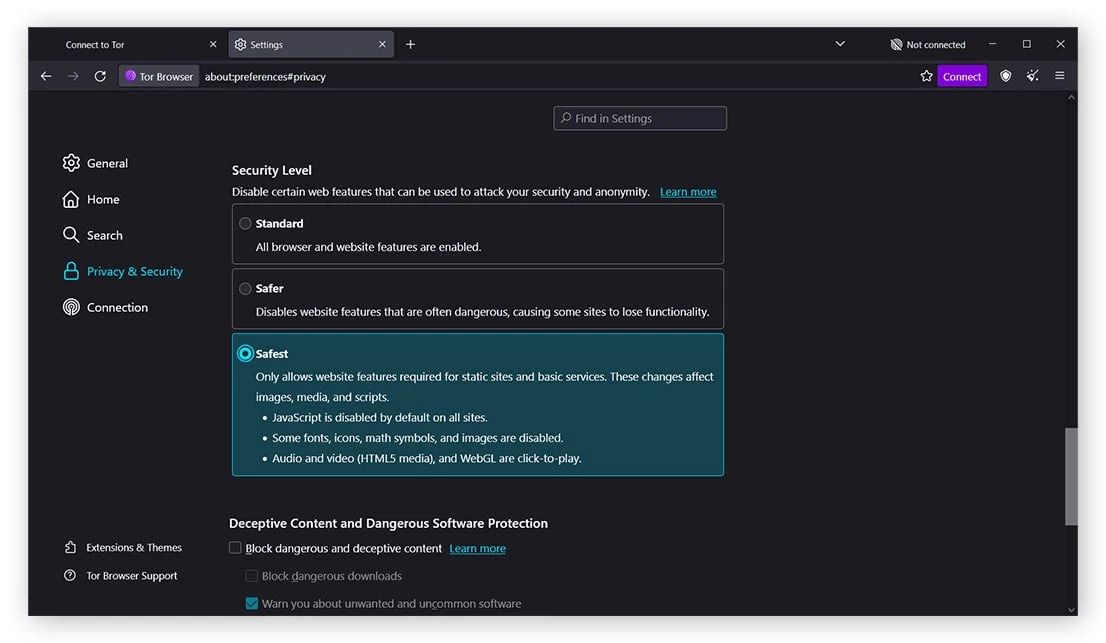
Tor Browser ships three levels: Standard, with every feature enabled; Safer, which disables JavaScript on non-HTTPS sites, disables some fonts and math symbols, and makes audio and video click-to-play; and Safest, which disables JavaScript everywhere by default and permits only the features needed for static content, affecting images, media, and scripts broadly.Tor Project The step nearly every third-party guide gets wrong or omits entirely: Tor's own current documentation states that after changing the level, "you can undo the changes at any time by adjusting your Security Level and restarting the browser"Tor Project — the change requires a restart to actually take effect. A guide describing a shield-icon menu that applies the change instantly is describing an older version of the browser, not the one you're running.
Browser fingerprinting, and how to actually check yours
Fingerprinting is tracking through the combination of a browser's settings and features rather than through cookies — silent, requiring no permission, and effective even for a user who has never accepted a single tracking cookie.Tor Project Tor Browser's defense isn't making every user identical, which isn't achievable — it's sorting users into a small number of large, indistinguishable "buckets" for each measurable trait. Letterboxing is the clearest example: rather than letting your window report its exact pixel dimensions, Tor Browser adds margins so your reported size rounds to one of a small set of common sizes shared by many other users at once, specifically defeating the trivial approach of fingerprinting people by unique screen dimensions.Tor Project User-Agent spoofing works the same way deliberately: every Windows installation reports as Windows 10, every macOS installation as OS X 10.15, every Android device as Android 10, and Linux, Tails, and Qubes are all collapsed into one reported string, "Linux running X11" — not because those de are actually true for every user, but because a large, shared bucket is safer than an accurate, unique one.Tor Project This is exactly why you can't choose which platform Tor Browser claims to be: offering that choice would only make each choice rarer and therefore more identifying, defeating the entire strategy.Tor Project There's no built-in "test my fingerprint" panel inside Tor Browser itself, but the same principle from the Tor Browser guide tells you what to check: an installed extension, a resized window, or a non-default zoom setting each pull you out of your bucket and back toward being individually identifiable — the single biggest thing you personally control is simply not doing any of those three.
The risk Tor cannot touch: what you type
Tor Browser hides who you are and where you're connecting from; it does nothing at all once you voluntarily type identifying information into a page. Log into an account tied to your name, fill out a form with your real address, or use a username you've used anywhere identifiable before, and that site now knows exactly who's behind the anonymous connection it's seeing — Tor Project's own guidance calls this the reason to "be vigilant and extremely cautious when filling out web forms."Tor Project This is also the exact mechanism behind account lockouts: a bank or email provider seeing a login from what looks like a different part of the world than your usual one may treat it as a compromised-account signal and lock you out, which is a real, common annoyance rather than a security failure on Tor's part — the fix is the provider's own account-recovery process, not disabling anything about how Tor works.Tor Project
Never torrent over Tor
This deserves to be stated as an absolute rather than a caveat: torrent clients have been observed to ignore proxy settings entirely and connect directly regardless of what you've configured, and even when a client does route through Tor correctly, the BitTorrent protocol itself sends your real IP address in tracker requests as a normal part of how it functions — deanonymizing not just your torrent traffic but potentially your other simultaneous Tor activity as well, while also slowing the shared network down for every other user.Tor Project There is no safe configuration for this combination; it's not a setting to get right, it's a combination to avoid entirely.
Extensions and downloaded documents
Tor Project's own guidance recommends against installing any additional extensions at all, since they can bypass Tor's protections or otherwise compromise anonymity and privacy in ways that haven't been vetted the way the browser's own built-in protections have.Tor Project Downloaded documents carry a separate, sharper risk: a DOC or PDF file can embed internet resources that get fetched by whatever external application opens it, outside of Tor entirely, silently revealing your real IP address the moment you open the file while still connected — Tor Browser will warn before auto-opening such files, and that warning is not one to dismiss reflexively.Tor Project If you must open a file downloaded through Tor, do it on a disconnected machine, or use a dedicated sanitization tool built for exactly this problem, rather than trusting your everyday PDF viewer's default behavior.
A real case: is Tor still safe after a deanonymization?
In 2024, investigative reporting described the deanonymization of a user of Ricochet, a long-retired anonymous messaging application, through what Tor Project's own account describes as a targeted, multi-year law-enforcement guard-discovery attack occurring between 2019 and 2021.Tor Project blog, 18 Sept 2024 Tor Project's own response is candid rather than reassuring by default — it states plainly that it was given only a vague outline rather than full access to the underlying case documents, and that it was "left with more questions than answers."Tor Project blog, 18 Sept 2024 What the project does say with confidence: the affected user was running an old version of Ricochet lacking a specific protection, called Vanguards, that had already shipped in the maintained fork by the time of the attack, and the attack exploited the fact that this particular application's design made a user's online/offline pattern observable in a way current protections address.Tor Project blog, 18 Sept 2024 The honest takeaway isn't "Tor was broken" or "nothing to see here" — it's narrower and more useful: a specific, outdated application had a specific, since-addressed weakness, exploited in a resource-intensive, targeted operation against one user over years, which is a meaningfully different threat than what an ordinary reader of this site faces, and also a real reminder that keeping every piece of software you use current — not just Tor Browser itself — is part of what "safe" actually depends on.
Is using Tor legal?
In the large majority of countries, yes — using Tor itself is not a crime, and it's used routinely by journalists, NGO workers, corporations protecting sensitive communications, and ordinary people avoiding tracking, none of whom are doing anything unlawful by connecting.Tor Project A small number of jurisdictions restrict or heavily monitor Tor use specifically, which is a different and narrower claim than "Tor is illegal" globally — and separately, and importantly, using Tor legally does not make whatever you do once connected lawful; accessing a market or content that's illegal in your jurisdiction remains illegal regardless of the anonymity layer underneath it. This site cannot give jurisdiction-specific legal advice — see the disclaimer for what that means in practice.
Tor Project's position on VPNs, in one sentence
Tor Project does not generally recommend combining a VPN with Tor unless you have a specific, advanced reason and understand exactly what each layer changes about what the other layer's observers can see — stacking them incorrectly can reduce rather than improve your actual privacy. The full comparison of what each tool protects, what each observer sees in which order, and the cases where combining them makes sense anyway lives on Tor vs. VPN, which is worth reading in full rather than defaulting to "more layers is always safer."
For the mechanism behind everything on this page — why the circuit design produces these specific guarantees and these specific gaps — see how Tor works. And since most of what actually gets a Tor user identified happens around the browser rather than inside it, the OPSEC guide covers the habits this page's fingerprinting and self-disclosure sections only start.