 RapTor
Ledger Setup and Trezor Setup, Side by Side: Where the Two Flows Actually Differ
Ledger setup and Trezor setup are each thoroughly documented by their own vendor, and neither vendor has any reason to tell you how their flow compares to the other's — so ten search results across both queries all come from the two companies themselves, and the differences a buyer would actually use to choose between them go unstated. This page runs both flows side by side and names the differences that matter: PIN policy, backup word count, per-coin app requirements, and the upsells sitting inside each vendor's own security flow.
If the device arrived with a PIN or recovery phrase already set
Stop immediately. A hardware wallet is designed so you generate the seed yourself, on the device, during first setup — a device that arrives with a PIN already configured or a recovery phrase already written on an included card has been tampered with or seeded by someone other than you, full stop, and using it means whoever set that phrase already has access to anything you deposit. Neither vendor's own setup flow ever asks you to accept a pre-existing backup as your own; both flows begin from "create a new wallet," generating fresh keys on-device only after you initiate that step. Return the device to the retailer and, if you bought from anywhere other than the vendor's own store, treat that as the root cause worth fixing before you buy a replacement.
PIN length and wipe policy: a real, meaningful difference
| Property | Trezor Safe 3 / Safe 5 | Ledger Flex |
|---|---|---|
| PIN length | 4 to 50 digitsTrezor | 4 to 8 digitsLedger |
| Wrong attempts before wipe | 16Trezor | 3Ledger |
| Entry method | On-device touchscreen or buttons, cursor position changes each attempt | On-device touchscreen |
Neither policy is simply better. A longer PIN with more attempts before a wipe suits a device that might be physically found by someone patient enough to try guessing — the doubling delay after each wrong attempt Trezor implements makes a 16-attempt brute force take an impractically long time regardless of the higher count. A short PIN with a fast three-attempt wipe suits a threat model where you'd rather the device erase itself quickly than sit exposed to a sustained attempt. Pick based on which failure mode worries you more, not on which number sounds more secure in isolation.
Confirming the device is genuine, and what that actually proves
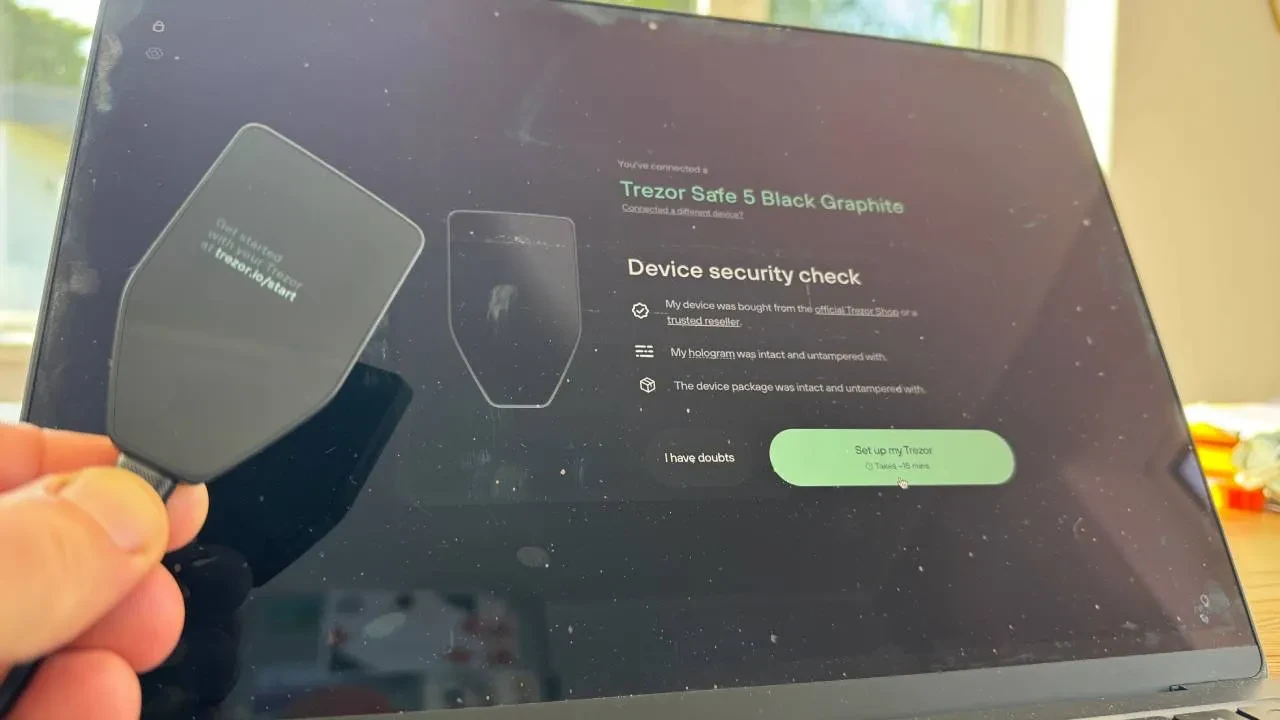
Trezor's flow runs a Secure Element authenticity check during setup, described as confirming the device "was genuinely made by Trezor and hasn't been altered."Trezor Ledger's flow runs an equivalent cryptographic "Genuine Check" through the Ledger Wallet app immediately after pairing.Ledger Both checks prove the same narrow thing: the secure chip inside the device is cryptographically responding the way a genuine, unmodified chip from that vendor should, verified through the vendor's own official app. Neither check proves the box wasn't opened and resealed convincingly, and neither check is a substitute for buying directly from the manufacturer in the first place — it's a second layer, not the primary defense, and a device that fails this check should never be used regardless of how it was purchased.
Which backup type to choose
Trezor's newer devices default to a 20-word single-share backup, but the actual default depends on when the specific unit was manufactured: 2023-era Safe 3 units with older recovery-seed cards default to 12 words, while 2024-and-later units default to 20.Trezor Both are secure on their own terms, but only the 20-word version can later be upgraded to a multi-share backup — splitting the backup into several independent shares, any subset of which reconstructs the wallet — while a 12-word backup stays single-share permanently.Trezor Ledger's Flex, by contrast, generates a fixed 24-word Secret Recovery Phrase with no word-count choice at setup at all.Ledger If you think you might want a multi-share split later — for inheritance planning or splitting a backup across locations without any single location holding the whole thing — choose the 20-word option on a Trezor device now, since the choice narrows later rather than widening.
The vendor recovery subscription, and whether you have to use it
Ledger offers an optional subscription service, Ledger Recover, described as providing "a secure, distributed backup of your Secret Recovery Phrase" for an additional fee.Ledger It is optional — the base setup flow works completely without it, and declining it does not weaken the device's own security. Whether it's worth using is a real trade-off rather than an easy no: a distributed third-party backup solves the genuine problem of a single point of failure in your own paper or metal backup, at the cost of trusting additional parties with fragments of your seed's recoverability. For most readers who already maintain a properly tested, physically secure backup — covered in full on seed phrase backup — the subscription is an added cost solving a problem you've already solved yourself; it's worth considering only if you have no other reliable recovery plan at all, which is a gap to fix directly rather than paper over with a subscription.
Why one platform needs a separate app per coin, and the other doesn't
Ledger's architecture requires installing a dedicated app on the device for each cryptocurrency you want to manage — Bitcoin, Ethereum, Solana, and so on each need their own installed app before you can receive that asset.Ledger Trezor's flow instead has you "activate assets" from a list within Trezor Suite, without a comparable per-coin app-install step described in the same way. The practical difference: a Ledger device with many coin apps installed uses more of its limited on-device storage and requires you to manage which apps are present, while a Trezor device's asset support is handled more centrally through the desktop or mobile app rather than the device's own storage. Neither approach is a security downgrade — it's a storage-and-workflow difference, worth knowing before you're confused mid-setup about why one device is prompting you to install something the other never mentioned.
Verifying your backup before funding the device
Both vendors build a check into their own setup flow — Trezor's device asks you to confirm specific words from your freshly written backup before finishing setup, and separately offers a dedicated recovery-check feature in Trezor Suite afterward that lets you re-enter the backup to confirm it matches without wiping anything.Trezor That in-flow check is a good first pass and not a substitute for the fuller test covered on seed phrase backup — actually resetting the device (with an empty wallet) and recovering from the written backup alone is the only check that proves the physical copy you'll rely on in an emergency actually works, rather than proving only that the words currently displayed on-screen match what you just wrote down.
Can the seed move to the other brand later?
If both devices use the same standard — BIP-39 for a 12 or 24-word phrase — the underlying seed is portable in principle, since BIP-39 is an open specification rather than a proprietary format tied to either vendor.BIP-39 A Trezor 12-word single-share backup and a Ledger 24-word phrase are different lengths but both conform to the same open standard underneath, so recovering one vendor's standard BIP-39 backup on the other vendor's device is generally possible. Trezor's multi-share backups (SLIP-39, a separate, newer standard the two vendors don't currently share) are not portable to a plain BIP-39-only device the same way — check which standard a specific backup uses before assuming it will import cleanly elsewhere, and when in doubt, treat a backup as vendor-specific until you've actually tested a cross-vendor restore on an empty wallet first.
Setting up from a phone
Both vendors support mobile setup with real limits on iPhone specifically. Trezor's own guidance states plainly that "iOS does not support USB-C connections for Trezor devices," requiring a desktop computer with Trezor Suite Desktop instead.Trezor Ledger's Flex setup flow is written mobile-first through the Ledger Wallet app, pairing over the device's available connectivity rather than requiring a fixed USB-C link the same way.Ledger If setting up entirely from an iPhone without ever touching a computer matters to you, that constraint alone may decide which device to buy before any other feature does.
Telling whether an older guide still matches your screen
Both vendors have renamed things enough that a guide even a year or two old can describe menus that no longer exist. Trezor's own documentation now distinguishes "wallet backup" from the older term "recovery seed" used on 2023-era cards — the same thing, renamedTrezor — and Ledger's rebrand of its own hardware devices to "signers" alongside the Ledger Wallet app name change means an older "Ledger Live" guide may not match current screens exactly. If a step in any guide, including this one, doesn't match what's actually on your screen, trust the current on-device and in-app language over the written instructions, and check the vendor's own current guide page directly rather than assuming a small mismatch means something is wrong with your device.
Before you buy either device, the hardware wallet guide covers the selection criteria this page assumes you've already worked through. Once your backup exists, seed phrase backup covers storing and testing it properly, and if Monero specifically is what you're setting this device up to hold, the Monero guide covers the firmware-version gotchas that apply to both brands.