 RapTor
Tails OS Guide: From a USB Stick to Your First Session
This Tails OS guide starts with the one question every other page skips past: whether Tails runs on the machine you actually have. Tails' own documentation is unusually thorough and unusually honest about the project's limits, but that material is spread across five separate pages that all assume you've already decided, and the trade-off Persistent Storage represents gets documented as a set of steps rather than the amnesia-versus-convenience decision it actually is. This page gates on hardware first, walks the boot and verification steps against the currently shipping release, and is explicit about what a system built entirely around forgetting itself can and cannot protect you from.
Does it run on your machine at all
Tails works on most PC computers less than ten years old, but the project rules out several categories of hardware entirely rather than merely discouraging them: Mac computers with an Apple processor — M1, M2, and every generation since — do not work, full stop, along with smartphones, tablets, and the Raspberry Pi.Tails Tails also does not work on 32-bit computers at all since version 3.0, and needs a 64-bit x86-64 IBM PC compatible processor specifically — ARM and PowerPC processors are ruled out the same way Apple Silicon is If your only machine is a Mac from the M1 era onward, Tails on that specific hardware is off the table, and Whonix or Qubes' USB flash drive trial route is where to look instead.
Memory is a softer limit but still worth respecting: Tails needs 3 GB of RAM (system memory) to run smoothly, and while it can technically run with less memory than that, it becomes unstable below that line — expect reduced performance, instability, or outright crashes Graphics cards are the least predictable failure point — Nvidia and AMD Radeon cards often don't work in Tails, which the project flags specifically for anyone shopping for a dedicated "gaming" laptop, and recommends instead a refurbished professional-series machine such as a Lenovo ThinkPad, several specific models of which are known to work well
How many USB sticks to buy, and why more than one
You need at least one USB stick of 8 GB minimum, and every byte on it is erased during installation The project's own recommendation, if you plan to use encrypted Persistent Storage at all, is two sticks and ideally three: one as your primary Tails, a second of the same size as a backup clone of the primary including its Persistent Storage, and a third — which can be smaller and lower quality — reserved for the manual upgrades needed on the occasions automatic upgrade isn't available Buy new sticks specifically, from well-known brands like Kingston, Samsung, or SanDisk, from a reputable local retailer rather than a marketplace listing or a stick that was mailed to you — the FBI has specifically warned that USB sticks arriving by mail have in the past contained malware such as BadUSB A stick supporting USB 3.0 is worth the small price difference; it can read up to ten times faster than USB 2.0, which matters every time Tails boots
Which version is current, and confirming the download is genuine
The currently shipping release is Tails 7.12, a roughly 1.8 GB download, and the project publishes release notes documenting exactly what changed, what was fixed, and what known issues remain in that specific version — worth reading before you install, since a guide describing an older release can quietly mislead you on de that have since changed Verification happens automatically through the download page itself now: Tails' own instructions state plainly that they "don't provide instructions to verify downloads with OpenPGP anymore" for the standard path, and instead the download page runs an automatic, JavaScript-based check that reports either "Verification successful!" or "Verification failed!" against the specific file you downloaded If it fails, the most common cause is simply an interrupted download rather than tampering — downloading again from the same source usually resolves it, and only if it fails repeatedly from multiple attempts should you suspect a compromised mirror or a network-level attack and try a different network or computer entirely A manual checksum comparison using a tool like GtkHash remains available for anyone who prefers it or has JavaScript disabled
Why the machine won't boot from the stick, and what to change in firmware
Most computers don't boot from a USB stick automatically — they need to be told to, using a Boot Menu key pressed immediately and repeatedly right after power-on, and which key that is depends entirely on the manufacturer: F12 on Dell, Fujitsu, Huawei, and Toshiba; F9 on HP; Esc on Asus; F11 on MSI; and a manufacturer-specific mix of F12, F9, F2, or Esc on Acer, Lenovo, and Samsung When the Boot Menu appears, select the USB stick from the list rather than letting the machine fall through to its normal startup disk. Macs (the older Intel-based ones Tails still supports) need an extra step first: boot into macOS Recovery, open Startup Security Utility, and explicitly choose "No Security" under Secure Boot and "Allow booting from external media" under External Boot — without that change, the firmware refuses to boot anything but the internal, signed macOS installation regardless of which key you press If the Boot Menu never appears at all for any of the keys tried, that usually points to a firmware setting rather than a bad stick — but if the stick genuinely doesn't show up in the list after several boot attempts, giving it two to three minutes of rest and trying again is the project's own first troubleshooting step, since some sticks need that pause right after being written
Whether to enable Persistent Storage, and what it costs in amnesia
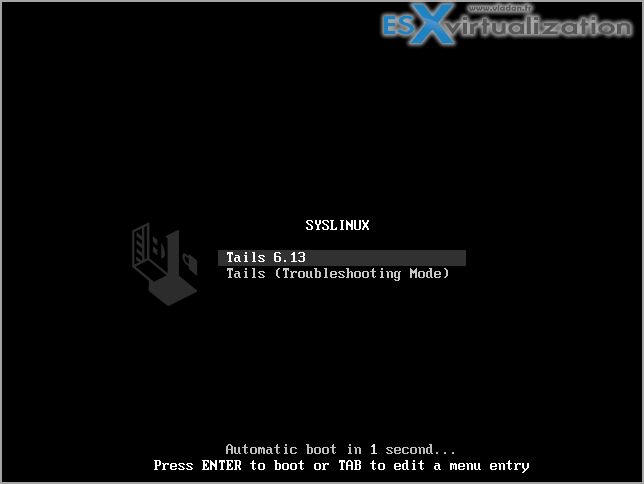
By design, Tails resets itself completely on every restart — nothing you do in a session survives to the next one unless you deliberately opt into Persistent Storage, created from Apps ▸ Tails ▸ Persistent Storage on the same USB stick, protected by a passphrase you choose yourself Tails is explicit that this passphrase cannot be recovered if forgotten, and recommends five to seven random words rather than a short, memorable one — written down temporarily on paper if needed to learn it, then destroyed The trade-off is exactly what the name implies: amnesia is Tails' core security property, the thing that makes a cold seizure of the machine recover nothing, and every file, bookmark, and configuration you choose to persist is something that now survives on the disk and can, in principle, be recovered from that storage device later. Enable it for what you genuinely need to keep between sessions; leaving the rest to reset is not an inconvenience, it's the protection working as intended.
What Tails still reveals, and what an observer at both ends can do
Tails does not hide the fact that Tor is in use — it can't, by design. Your ISP and local network can see that you're connecting to the Tor network even though they cannot see which sites you visit, and any site you visit can independently tell you arrived via Tor, because the list of Tor exit nodes is public Hiding that Tor itself is in use requires a bridge, a separate step covered in the Tor bridges guide. The exit node — the final relay in your three-hop circuit — can observe unencrypted traffic and, in the worst case, impersonate the destination server in a machine-in-the-middle attack, which is exactly why Tails and Tor Browser push you toward encrypted connections wherever possible and why a security warning inside the browser deserves real attention rather than a reflexive click-through The more serious theoretical risk is an end-to-end correlation attack: an adversary who can watch traffic entering and exiting the Tor network at the same time, at both ends of a circuit, might in principle link the two together — a limit no anonymity network protects against completely for real-time browsing, and one where Tails' own documentation is candid that a VPN is actually less secure than Tor against this specific attack, since a VPN doesn't spread trust across three independent relays the way Tor does Tails' own team states they aren't aware of this attack having actually deanonymized anyone in practice, which is a meaningfully different claim from it being impossible
What should never be done inside a Tails session
Never use one Tails session for more than one unrelated purpose. If you log into two different accounts inside the same session, a website can tell both logins used the same Tor circuit and infer they belong to the same person — Tails' guidance is to restart between activities entirely, for instance between checking a work email and a whistleblowing one, rather than trusting that switching tabs is enough separation Never share a file — a photo, an office document — without cleaning its metadata first; both formats commonly embed location, device, timestamp, and author information that has, in documented cases, been used to physically locate someone from a photo they thought was anonymous, and Tails ships Metadata Cleaner specifically for this Never install Tails from a computer you don't trust, never plug your Tails stick into another operating system while it's running, and never use your Tails stick to move files to or from a different OS — any of these risks corrupting the install in ways a from-scratch reinstall, not a patch, is the only reliable fix for
Upgrading without destroying your existing stick
Tails checks for and applies updates automatically when a newer release is available and you're already running from a properly installed stick — this is the normal path and it preserves your existing Persistent Storage. The exception is that a Tails stick currently cannot upgrade itself while running from itself; on the occasions automatic upgrade isn't offered, the project's documented workaround is to boot from a second, intermediary Tails stick, unplug your primary, then run the upgrade process pointed at your primary stick from that intermediary session — which is exactly why the third, smaller USB stick recommended above exists This is also the point to reiterate: if you ever suspect your primary stick was corrupted — a suspicious crash, an unexplained change in behavior — a manual upgrade from a machine you trust is the recommended recovery step, not a Persistent Storage backup restore, since the backup could carry the same corruption forward
When Tails is the wrong tool, and Whonix or Qubes is the right one
Tails is built entirely around amnesia and is unusually good at surviving a machine being physically seized cold — nothing on the internal disk to recover, by design. It is not a hardened distribution the way Whonix is, it updates only once every six weeks rather than continuously, and a Tails session compromised by malware could in principle bypass its own Tor-routing protections, which the fuller comparison on secure operating systems covers in detail. If your actual threat is a sustained, ongoing compromise of the software you run rather than a one-time physical seizure, or if you want isolation between different activities stronger than "restart between them," Whonix or a Qubes OS setup running Whonix internally is very likely the better fit, and neither replaces the reasoning in the OPSEC guide that decides which of these you actually need in the first place.
Once Tails is running, the PGP guide covers encrypting and verifying anything you send or receive from inside a session, and the Tor Browser guide covers the browser itself, which behaves the same way inside Tails as it does anywhere else. If Tails' amnesia turns out to be the wrong trade-off for your situation, the Whonix guide is the next page to read.