 RapTor
Qubes OS Guide: Checking Your Hardware, Then Installing It
Qubes OS's own documentation is thorough and current, and still manages to scatter the actual decision across five separate pages split between two different version paths, hedge the hardware requirement with "necessary, but not sufficient" without ever saying what else could still go wrong, and never once frame its bundled Tor integration as a reason to choose the system over the alternatives. This Qubes OS guide totals the real hardware cost in one place, works through what actually happens during installation, and defines the vocabulary — qubes, templates, dom0 — that every other page assumes you already know.
Which release is current, and how long it's supported
The Qubes OS 4.3 series is the current supported line, and the ISO actually worth downloading is the 4.3.1 point release, published 11 June 2026 to consolidate the security fixes and bug fixes that had accumulated since 4.3.0 first shipped on 2025-12-21 — the project's own downloads page names 4.3.1 as "the latest stable Qubes OS release" and recommends it for every new and existing user, not the original 4.3.0 ISO.Qubes OS, 11 June 2026 The series' end date is still to be determined — Qubes releases are supported for six months after the next major or minor release ships, and the two previous series, 4.1 and 4.2, are now both unsupported, with 4.2 reaching end of life on 2026-06-21, 21 June 2026 A guide written against 4.1 or 4.2, or against the original 4.3.0 ISO, may still be mostly accurate, but check the release number it references before following installer screenshots literally — the boot menu in 4.3 explicitly offers an "Install Qubes OS 4.2.1 using kernel-latest" fallback option specifically for hardware that struggles on the current kernel, which is itself a sign of how much can shift release to release
Whether your processor supports the required features, and enabling them in firmware
Qubes needs specific virtualization extensions present and switched on, not just present — a processor that supports them with the setting left off in firmware will fail the installer's compatibility check just the same as one that lacks them entirely. On Intel boards, enable both Intel VT-x (standard virtualization) and Intel VT-d (I/O virtualization, sometimes labeled "Intel Virtualization for Directed I/O"); on AMD boards, the equivalent pair is AMD-V and AMD-Vi (also called AMD IOMMU) Both settings live in the BIOS or UEFI menu, typically nested under an Advanced tab, though some manufacturers file them under Security instead — without VT-d/AMD-Vi specifically enabled, Qubes may still install, but it "won't be able to enforce isolation," which defeats the entire reason to run it If the installer's own compatibility check fails after you've confirmed the hardware exists, this setting being left disabled is the first thing to check before assuming the machine simply can't run Qubes
The realistic hardware bill, totaled in one place
Qubes' own system requirements page states a minimum — 6 GB RAM, 32 GB storage, a 64-bit Intel or AMD processor with the virtualization and IOMMU features above — that the project itself says is "necessary, but not sufficient" for the system to actually run well The number that actually determines a comfortable experience is the recommended tier: 16 GB of RAM, 128 GB of free storage with a high-speed SSD strongly recommended, Intel integrated graphics preferred over a discrete Nvidia or AMD GPU (Nvidia in particular "may require significant troubleshooting"), a non-USB keyboard or multiple separate USB controllers, and — for the strongest configuration — a Trusted Platform Module with proper BIOS support to enable Anti Evil Maid, a tamper-detection feature Add all of that up before shopping for hardware rather than after: a machine that clears the 6 GB minimum but not the 16 GB recommendation will run Qubes, but every qube you open is competing for a much smaller pool of memory than the system was designed around. There's no current, reliable list of specific compatible laptops the way there is for Tails' ThinkPad recommendations — Qubes' own certified-hardware and community-recommended-hardware lists are the closest equivalent, and worth checking against a specific model before buying rather than assuming this table alone guarantees a smooth install.
Why one processor vendor isn't recommended, and what that means for buying a machine
Qubes' own hardware page names this directly rather than leaving it as an inference: "AMD processors are not recommended due to inconsistent security support on client platforms."Qubes OS The mechanism is specific — on Intel platforms, microcode security updates (fixes for CPU-level vulnerabilities) can typically be loaded directly by the operating system, letting Qubes' security team ship a fix quickly alongside other updates. On AMD's client platforms, by contrast, microcode updates generally ship only through system firmware, meaning users have to wait for AMD to distribute the fix to motherboard manufacturers and then wait again for that manufacturer to release a BIOS or UEFI update — a chain that has historically taken AMD weeks to months longer for client hardware than for its server platforms facing the identical vulnerability This doesn't mean Qubes fails on AMD hardware, and the project is careful to say systems that no longer receive microcode updates at all still "offer significant security advantages over conventional operating systems on the same hardware" — it means an Intel machine that's still receiving microcode updates is the safer default choice if you're buying specifically for this
Whether Qubes can be tried without wiping the laptop
Yes, and the reliable route is not the boot menu's "Test this media and install Qubes OS" option — that only verifies the installer image itself is undamaged before proceeding into a real install, it isn't a live trial mode. The route that actually avoids touching your existing drive is choosing a separate external drive — a fast USB 3.0 flash drive or an external SSD, 32 GB minimum — as the installation destination instead of your laptop's internal disk during setup; Qubes' own installer explicitly supports this, and testing hardware compatibility this way, across several machines if needed, before committing to a permanent install is a documented, sanctioned use case What doesn't work at all is running Qubes inside a virtual machine on another operating system — nested virtualization isn't supported, because Qubes needs to manage the hardware directly through its own Xen hypervisor rather than sharing it with a host One more thing worth taking seriously before installing anything: Qubes' own documentation states plainly that "no software can provide security if it is installed on compromised hardware," and specifically warns against installing on a computer you don't already trust — Qubes cannot retroactively secure hardware that was compromised before you ever touched it
Dom0, templates, app qubes, and service qubes — the vocabulary every other page assumes
Dom0 is the administrative domain — an offline, no-network core that manages the GUI, disk encryption, and every other qube, but never touches the internet directly, which is exactly why a network-level compromise of any qube can't reach it. Templates are shared, read-only base filesystems — a Fedora or Debian template, for instance — that one or more qubes are built from; installing software into the template makes it available to every qube using that template, which is also why installing software directly into a regular app qube instead of its template means that software vanishes the next time the qube resets. App qubes are the qubes you actually work in day to day, each based on a template but keeping its own separate, persistent home directory and network state. Service qubes are the specialized qubes that provide a function to other qubes rather than being worked in directly — sys-net, which holds your network hardware and nothing else; sys-firewall, which filters traffic between sys-net and everything behind it; and sys-usb, which isolates USB controllers so a malicious USB device has to compromise a disposable qube before it can reach anything that matters
How many qubes to start with, and what goes in each
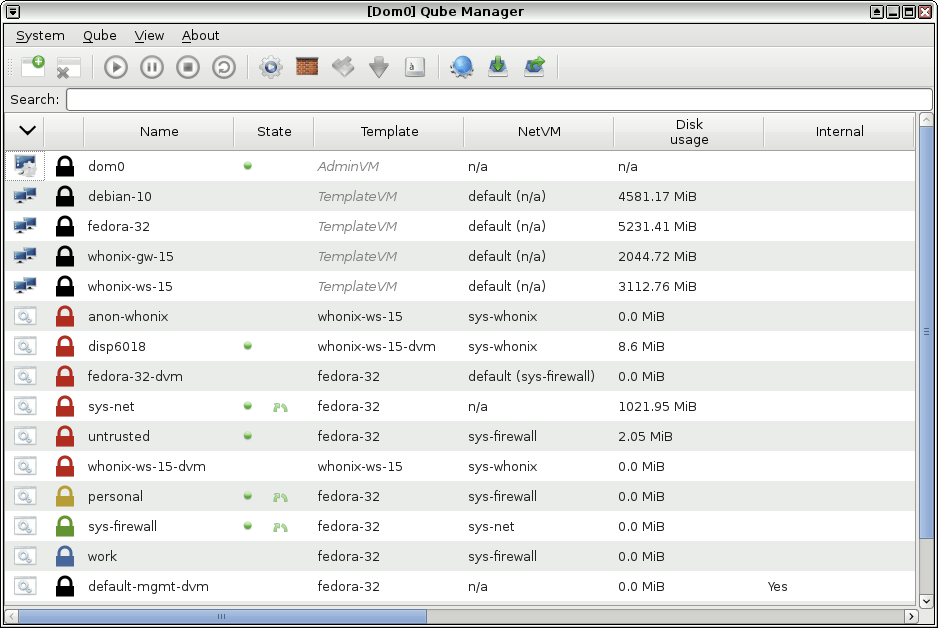
The installer's own default configuration is a reasonable starting point rather than something to second-guess immediately: sys-net, sys-firewall, and a default disposable VM for the core system, plus four suggested app qubes — personal, work, untrusted, and vault — that the installer itself describes as "just suggestions that apply to most people," not a fixed requirement, and any of them can be deleted or renamed later The logic worth keeping even if you rename everything: vault should hold nothing that ever needs network access — a password manager, key material — precisely because it has none; untrusted is where anything you don't fully trust yet gets opened first; and personal and work stay separated specifically so that a compromise in one doesn't automatically expose the other. sys-net and sys-firewall are both made disposable by default, resetting to a clean state on every boot, which the installer flags as fitting most users' needs without giving up meaningful convenience
How the bundled Tor gateway works, and why that's a reason to choose Qubes
The installer offers to create Whonix Gateway and Workstation qubes — sys-whonix and anon-whonix — directly during setup, and separately offers to route dom0's own template and system updates through Tor via Whonix This is worth naming as a genuine reason to pick Qubes specifically rather than a footnote: instead of running Whonix as a separate VirtualBox or KVM setup on top of an ordinary host operating system, Qubes gives you the same Gateway-and-Workstation isolation as qubes within a system that's already isolating everything else you do, with the option to extend Tor-routed updates to the rest of the machine's software as well.
Installing software so it persists, and moving files between qubes
Install into the template, not the app qube, if you want it to survive a restart — an app qube's own filesystem changes outside its home directory reset to match its template every time it starts, which is a security feature, not a bug, but it catches almost everyone once. Moving a file between two qubes deliberately uses Qubes' own cross-qube copy mechanism rather than a network share or a USB device passed between them, which keeps the same isolation intact instead of quietly punching a hole through it — the file arrives in the target qube's dedicated incoming folder for you to review, rather than landing wherever the source qube says it should.
What usually goes wrong first, and backing up before it does
The single most common beginner mistake is confusing template updates with individual qube updates — updating a template and then wondering why an app qube still shows the old software, when the app qube simply hasn't been restarted to pick up the new template state yet. The second is forgetting the installer's own reminder at the end of setup: remove the installation USB and disconnect any unneeded USB devices — security dongles, an external mouse or keyboard — before the first real reboot, since a USB keyboard left connected can cause the second-stage setup to grant it direct access to dom0 by default, which is convenient but is exactly the kind of default the rest of this system exists to avoid Back up before making structural changes to qube configuration or templates — Qubes' own backup tooling can export the full state of your qubes, and restoring from that is a far better first response to something broken than trying to diagnose a half-working system from inside it.
If Qubes' hardware bill doesn't fit your machine, secure operating systems covers where Tails and Whonix fit instead, the Tails OS guide covers the amnesic USB-stick alternative with a far lower hardware floor, and the Whonix guide covers running the same Gateway-and-Workstation model without Qubes underneath it. The OPSEC guide is where the underlying threat-model decision actually gets made.